


Will you…?
The “Will you be my Valentine?” page where no isn’t an option.
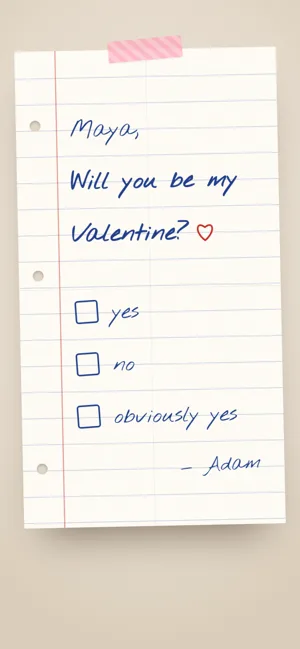
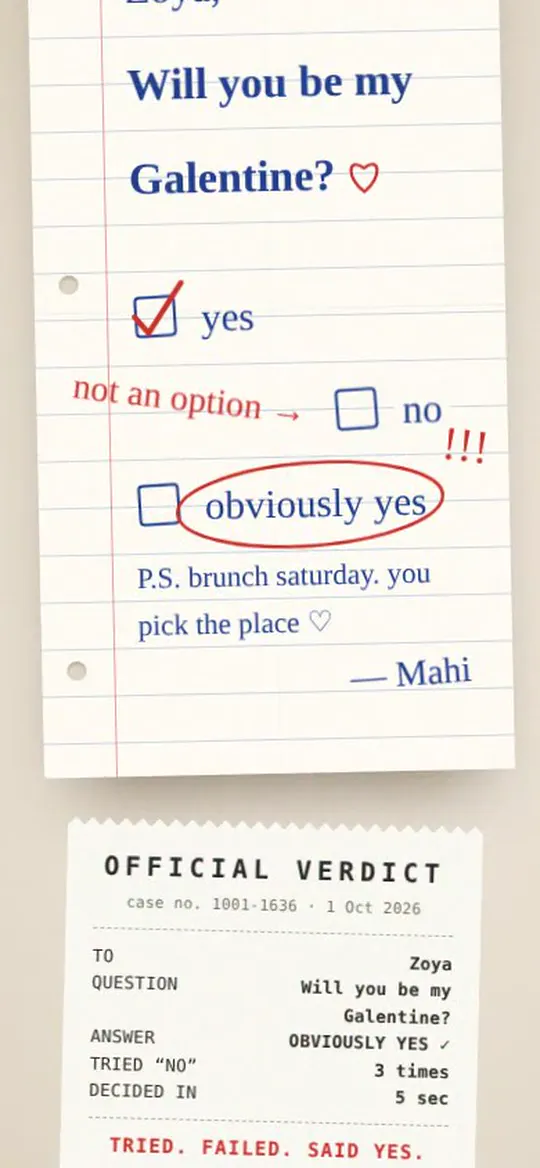
A “Will you be my Valentine?” website is a page with her name, your question and a “no” button that runs away when she reaches for it. On Tap for Her it’s a folded note passed in class: yes, no, obviously yes. Tick yes and a verdict receipt prints her tries; you get her answer instantly. Free, with your own question.
What’s inside
- Your own question“Will you be my Valentine?”, “Dinner Friday?”, “Forgive me?”, “Bestie forever?”
- The runaway noIt hops away six times, then gives up and gets scribbled out.
- The verdict receipt“Tried no: 4 times · decided in 12 sec · tried. failed. said yes.” She screenshots it.
- A P.S. when she says yes“pick you up Saturday at 8. wear the blue one ♡”
- Her answer, to youYou see it the moment she ticks it.
How to make a will you be my valentine website
- 1Type her nameEvery page already says it — in the stars, on the envelope, on the receipt. Pick who it’s for: girlfriend or wife, bestie, sister or mum.
- 2Pick a page and add you twoChoose from the handmade pages or a quick one. Add photos, your words, a song or a voice note. The preview updates as you type.
- 3Send one linkShare it on WhatsApp or hide a QR card in flowers. You see the moment she opens it, and read her reply.
About ten minutes. Make yours — it’s free →
Questions people ask
Is it really free?
Yes, while we launch. Every page and every feature — photos, music, the voice note, love coupons, the friends’ wish wall and her reply — is free, no card needed, and the link doesn’t expire.
Can I change the question?
Yes — type anything up to 80 characters. The third box (“obviously yes”) and the P.S. change too.
Does it work for friends?
Yes. Choose Bestie when you make it and the page says “Galentine”, with the wording to match.
Does she need to install anything?
No. She taps the link and it opens in her browser on any phone or computer. Nothing to download, no account to make.
Is it private?
The link is a random code that isn’t listed anywhere, so only the people you send it to can open it. You can edit or delete it any time.